

Fences
|
软件语言:
|
软件授权:免费
|
|
适用系统:Windows
|
创建时间:2020-12-11 |
|
软件厂商/开发者信息: -
|
|
资讯 更多
- Fences v3.0.9.11 官方版更新 2020-06-23
简介
 它可以将不同的图标放到不同的“容器”当中,使用者还可以移动和拉伸这个“容器”。这样将图标分类以后,桌面再也不会看起来一团糟了。它还提供了一个有趣的功能:双击桌面,隐藏所有图标;再次双击桌面,显示所有图标。
Fences™ is a program that helps you organize your desktop, and can hide your icons when they're not in use. A "Fence", a term coined by this program, is an icon group on your desktop. Fences is an add-on to your desktop, not a replacement.Your desktop by creating shaded areas which become movable and sizable containers for your icons. Double click blank spaces on your desktop and all your fences will fade out, and back.
配置要求
系统需求:
- 需要:Windows 8,Windows 7, Windows Vista, 或 Windows XP 系统。
- 同时支持 32 位和 64 位 Vista 和 Windows 7 系统。
- 为了下载和升级 软件必须安装 Impulse 平台。
System Requirements
- Requires: Windows 7, Windows Vista, or Windows XP.
- On Vista and Windows 7, both 32bit and 64bit versions are supported.
- Impulse must be installed in order to download and update software.
功能特点
基本功能
1)对你的桌面分块
Fence 允许你在您的桌面上创建阴影区,你可以阴影区放置图标。你可以标上你喜欢的标签,在桌面上任意的移动调整它们,对于新用户 Pre-included 布局可以帮助他们快速的布局。
2)重新全显你的壁纸,双击可以快速轻松的显示和隐藏桌面图标。
在 桌面空白处双击来隐藏你的桌面图标,再次双击时显示桌面图标。我们认为这是一个非常有用的特点,我们已经申请了专利,你甚至可以挑出图标或 Fence 以排除。
3)创建快照,并具有自动缩放功能(屏幕尺寸变化)
快照(备份)功能可以截取你使用前和第一次使用时的快照,同时你可以在任何时间截取当前桌面的快照以保证不会丢失布局。
4)在桌面上创建透明的阴影区域将桌面图标进行分组排列,你可以将任意图标放入此区域,并可移动区域位置,调整其大小;
5)双击桌面空白区域(或按 Esc),便会快速隐藏所有桌面图标,再次双击,图标又会回来;
6)可通过鼠标右键在桌面画一个矩形的 Fences,任意调整其位置和大小;可创建桌面图标快照。
快速提示
按住“windows 键”然后按下字母 D 可“快速访问 桌面”,第二次按下上述组合键可恢复到刚刚使用的窗口。
更改屏幕分辨率时,您的 Fence 会自动缩放以保持您的图标布局。如果您经常更改分辨率,清使用“更多工具”中的设置,以按屏幕分辨率独立存储您的 Fence 布局。
历史
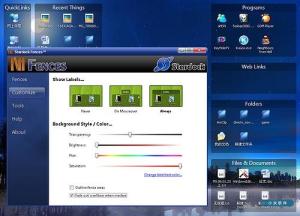 "Fences", originally "Desktop Icon Organizer", was started in 1999 as a tool to help standardize desktops across PCs, back in the author's high school "web-editors club" computer lab. (Screenshots from / download the 2003 prototype edition) It wasn't until 2007 when the idea was first publically announced and brought for discussion around the web. About a year later the program finally got its chance at a Vista-compatible remake, and in 2008 Stardock proudly announced its new product, "Stardock Fences"!
版本区别
Fences 是免费软件,而 Fences Pro 是收费软件,提供了更多的功能。
| Feature | Free | Pro |
|---|---|---|
| Create an unlimited number of Fence areas on desktop | O | O |
| Quickly hide/show desktop icons with double-click | O | O |
| Customize opacity and color tinting of Fences | O | O |
| Auto-scaling for screen size changes | O | O |
| Store unique Fence locations for different monitor configurations | O | O |
| Low profile, low system impact: integrates tightly and cleanly with OS | O | O |
| Ability to configure a default Fence for new icons | X | O |
| Automatically organize icons into Fences by file type, name, etc | X | O |
| Sort icons in a Fence by date, type, size, name, times used, etc | X | O |
| Have your fences appear faded until mouseovered | X | O |
| Takes automatic recovery-snapshots of your desktop's layout | X | O |
| * Customize Fences with custom images, logo, textures, etc | X | O |
| * Customize the look and feel of each Fence individually | X | O |
版本功能对比
注意
(2010.7)
fences free 的官方网站的版本号为 1.01(2010 年 7 月),且安装后自带简体中文(window7 测试可以)网上的 2.0 汉化疑似有问题,请慎重选择。
官方的没有自带删除程序,可以使用 unlocker 软件对 安装目录进行删除。再用 360 等 软件清理。
2018.2.8官方网站已发布 3.0.9.11 版,喜欢的朋友可以直接到官网下载。
演唱歌曲
歌手姓名:Marit Larsen
发行时间:2008-10-13
发行公司:EMI
语种:英语
收录在《The Chase》
歌词:
made by gaby
in the heat of the battle
he who hesitates is lost
every word is here on my tongue but
won't come out at any cost
oh they're aching
yarning
these fences we invent with what we say
these fences are growing taller every day
these delicate fences
on my mind
and in my way
waiting for the dust to settle
i'm waiting for another go
is it time
i realise now
forgiving me is not what you want
oh they're tossing
turning
these fences we invent with what we say
these fences are growing taller every day
these delicate fences
on my mind
and in my way
in the heat of the battle

版本列表
-
-

-
桌面图标管理软件 v4.0.0.3 官方版
桌面图标管理软件(Stardock Fences),Fences是著名的Stardo ...
软件大小:12.4 MB 更新时间:2021-12-11
-
-
-

-
Fences v3.0.9.11 官方版
Fences栅栏桌面是款简单清爽的桌面整理软件,帮助用户快速整理桌面,解决桌面文件多 ...
软件大小:12.1 MB 更新时间:2020-06-23
-

