
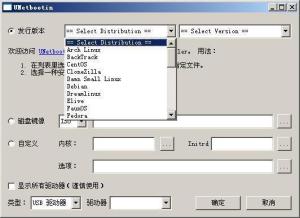
UNetbootin
|
软件语言:
|
软件授权:免费
|
|
适用系统:Windows
|
创建时间:2020-12-11 |
|
软件厂商/开发者信息: -
|
|
资讯 更多
- UNetbootin v6.57.0.0 中文绿色版更新 2017-11-07
简介
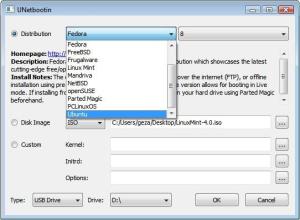
用 UNetbootin 可以轻松的把 Linux 操作系统装进 U 盘 你可将 U 盘插到 USB 接口。注意:一定要先插 U 盘再运行 UNetbootin!然后从菜单“应用程序——系统工具”里运行 UNetbootin 软件。然后把你下好的 iso 文件放到 U 盘里,重启电脑,并设置 U 盘为第一启动设备,即可启动 U 盘里的操作系统。
unetbootin 允许将各种 Linux/ BSD 的发行版安装到一个真正的分区,所以它跟一个标准的安装没什么两样,除了它的优势:不需要 CD 光碟。
因此它可以用来安装一个标准的双系统,或完全由 GNU/Linux 取代现有的操作系统。
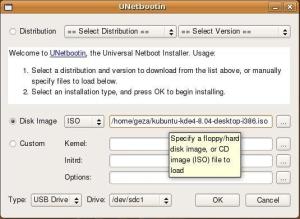 有些人,想安装 Linux 发行版但又不能刻录光盘,或者想安装到一台没有 CD-ROM 的电脑上,比如超便携笔记本电脑(译者:这样从优盘安装的方式就成为可能)。
(概述资料来源:)
支持的版本
Ubuntu (and official derivatives) 8.04 LTS 9.10 10.04 LTS 10.10 11.04
Daily CD Images
Debian Stable / Squeeze Testing / Wheezy Unstable / Sid
Linux Mint7 8 9 10
openSUSE10.2 10.3 11.0 11.1 Factory
Arch Linux2010.05
Damn Small Linux4.4
SliTaz Stable Cooking
Puppy Linux4.00
gNewSensedeltah-2.1
FreeBSD6.3 7.0 7.2 8.0
NetBSD4.0
Fedora10 11 12 13 14 Rawhide
PCLinuxOS2010
Sabayon Linux5.1 5.2
Gentoo2007.0 2008.0
MEPISSimplyMEPIS 8,AntiX 8
Zenwalk5.2
Slax 6
Dreamlinux 3.2
EliveDevelopment CentOS 4,5
Mandriva2007.1 2008.0 2008.1
LinuxConsole1.0.2009
Frugalware Linux Stable,Testing,Current
xPUD 0.9.2
加载工具
UNetbootin can also be used to load various system utilities, including:
unetbootin 也可以用来加载各种系统工具,其中包括:
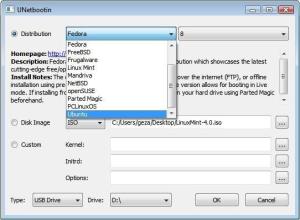 Parted Magic , a partition manager that can resize , repair, backup, and restore partitions parted.
Parted Magic,一个可以调整分区大小,修复、备份和恢复分区的分区管理器。
Super Grub Disk , a boot utility that can restore and repair overwritten and misconfigured GRUB installs or directly boot various operating systems .
Super Grub Disk,一个引导工具,可以恢复和修复被覆盖和错误配置的 GRUB 引导启动,或直接用来启动不同的操作系统。
Smart Boot Manager(SBM),它可以在没有光盘和软盘驱动器的情况下启动一台 BIOS 出错电脑。
离线 NT 注册和密码编辑,这样可以重设忘记的 Windows 密码。
freeDOS,它可以运行 BIOS 闪存和其他 DOS 下的小工具。
不需要光盘,UNetbootin 通过一个基于 Windows 或 Linux 的安装程序来对引导程序进行修改(例如 Vista 的 bootmgr 和 bcdedit,基于 NT 的系统的 grldr 和 boot.ini,Win9x 的 grub.exe 和 config.sys,还有 LInux 的 grub),依靠引导程序来启动所需要操作系统发行套件安装程序或加载系统实用程序。
After the distribution has been installed, or once done using the system utility, the modification to the bootloader is then undone.
安装结束操作系统或完成加载实用程序後,之前对引导程序所做的改动也将被删除。
版本信息
UNetbootin 5.81
软件名称:UNetbootin
软件版本:5.81
软件大小:4.83 MB
软件语言:英语
软件类别:应用软件
运行环境:Win9X/Win2000/WinXP/Win7/Win8
注意事项:一定要先插 U 盘再运行 UNetbootin!
系统要求
Linux 或微软的 Windows 98 - Vista
可以下载操作系统安装包的宽带网络连接,除非是预先已经下载好了安装包,如下文:
用于安装 Linux 发行套件的空余硬盘空间(大小视发行套件而定)
Installation Instructions 安装指南
howtoforge 指南:使用 UNetbootin 安装 ubuntu 或 Fedora
开始之前,请备份数据,以防在安装安装中或分区硬盘时出错。
下载您想安装的发行套件戓是相应的版本的操作系统。如果在 Windows 中,使用.exe 文件;Ubuntu、Debian、等支持 deb 安装包的系统,使用.deb 文件;Fedora、Suse 等支持 rpm 包的系统,使用.deb 文件;其它的 Linux 发行套件使用 sh(自释放)文件:
如果在 Windows 中,运行文件,单击“OK“重启。
如果使用 Linux,安装软件包后无需重启,直接在终端输入 unetbootin,运行需要 root 权限。
重启後,在系统启动时从列表中选择从 UNetbootin 进入。
If using Windows, this should appear:如果使用的是 Windows,就会出现:
截图
如果使用 Linux,选择 unetbootin 进入 GRUB 菜单後,界面如下图所示:
截图
然后,按照安装说明规定了具体分布进一步下面,等待作为套件是下载并安装。This portion of the installation can take up to several hours, depending on your connection speed and the amount of packages you install, so be patient.这部分人的安装,可以采取行动了几个小时,这取决于您的上网速度和数量,包安装,所以有耐心。
安装
USB 安装模式
这种安装模式建立开机 USB 随身碟(bootable USB flash drive)和开机 USB 硬盘(bootable USB Hard Disk Drive);这种模式是用来建立 Live USB。
跨平台(支援 Windows 和 Linux)
非破坏性安装(Non-destructive install)(不需格式化装置)使用 Syslinux。
支援主流 Linux(Linux 套件),包含但不只限于,Ubuntu、Fedora、openSUSE、CentOS、Debian、Linux Mint、Arch Linux、Mandriva、Puppy Linux、Slackware 和 FreeDOS,FreeBSD 以 及 NetBSD。
可以加载各种系统工具,包含但不只限于,Ophcrack、BackTrack 和 Gujin。
其他操作系统可以被加载,透过预先下载(pre-downloaded)ISO image 档或 custom kernel、initrd 和软碟/硬盘机 disk image 档。
自动侦测所有可移除装置。
硬盘安装模式
这种安装模式执行网络安装(network installation 或 frugal install)不需使用安装光碟,类似透过 Win32-Loader 执行。
UNetbootin 的不同功能在于它对多种 Linux 操作系统的支援,它的可携性(portability),它加载 custom kernel、initial ramdisk 和 disk image(含 ISO image)档的能力,以及它对 Windows 和 Linux 的支援。不像 Wubi,而是类似于 Win32-Loader,当安装到硬盘 时,UNetbootin 安装于硬盘分割(partition),而不是 disk image 档,所以建立 Linux 和 Windows 的 双重开机(dual-boot)设定。
启动盘
安装好 Unetbootin,现在来看看如何制作 U 盘启动盘,插入空白 U 盘:如果是 Ubuntu 系统,菜单“应用程序——系统工具”里运行 UNetbootin 软件,操作界面和 Windows 是一样的,最后,重启电脑,并设置 U 盘为第一启动设备,即可启动 U 盘里的操作系统进行安装了。
版本列表
-
-

-
UNetbootin v7.00 最新版
UNetbootin,使用unetbootin制作好U盘启动盘,在将syslinux ...
软件大小:4.6 MB 更新时间:2020-12-25
-
-
-

-
UNetbootin将Linux系统作U盘启动盘 v6.57.0.0
UNetbootin是一款将Linux系统制作成U盘驱动盘的工具,可以轻松把Linu ...
软件大小:4.6 MB 更新时间:2017-11-07
-

